Multilingual AI Chat Assistant
NaijaTalk is a chat assistant that actually answers in Yoruba, Igbo and Hausa, built because most AI tools quietly assume everyone thinks in English.
Visit live project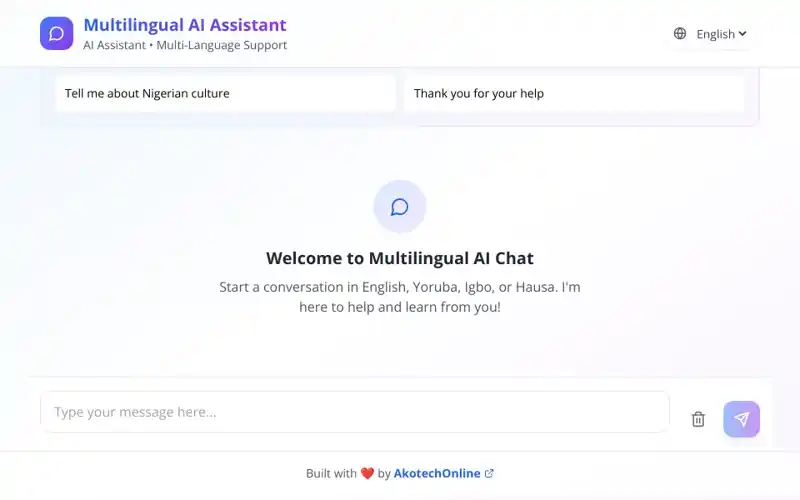
Overview
NaijaTalk is a browser-based AI assistant that lets you hold a conversation in English, Yoruba, Igbo or Hausa. I built it on my own time, end to end (the research, the interface, the front end and the model plumbing) because I kept running into the same gap: the tools everyone is being told to use are only really usable if English is your first language.
The problem
I noticed this first while teaching digital literacy and later at the reference desk: people ask far better questions in the language they think in. Someone who can explain exactly what they need in Yoruba will translate it into a flat, vague English sentence for a chatbot, get a flat, vague answer back, and conclude the tool is not for them. That is not a language problem, it is an interface problem. Mainstream assistants technically accept other languages, but nothing on the screen tells you that, no visible language choice, no example prompts you recognise, no signal that your language belongs there.
- Language support that exists but is invisible reads as language support that does not exist.
- A blank input box feels like an exam. First-time users genuinely do not know what to type.
- Replies drift back to English mid-conversation, which quietly tells the user they were tolerated, not welcomed.
- Most of the people I had in mind are on mobile phones and paying for data by the megabyte.
The solution
So I made the language the first thing you see rather than something buried in settings. NaijaTalk opens with a greeting, names all four supported languages out loud, and offers a couple of tappable example questions so you can see what a good prompt looks like before you write your own. The language switcher lives in the header next to the product name, switching never costs you the conversation. Everything else is stripped back on purpose: one obvious send button, one clearly labelled way to clear the chat, and nothing decorative competing for attention.
- Language selection surfaced in the header, not hidden in a settings menu
- Starter prompts written in each language so the empty state teaches instead of intimidating
- System prompting that holds the chosen language across the whole conversation
- Deliberately plain layout. The fewer decisions before the first message, the better
How I built it
The front end is React and TypeScript with Tailwind, sitting on a small set of design tokens so spacing, colour and type stay consistent as I add to it. Model calls go through a serverless function rather than the browser, so the API key never leaves the server, and responses stream in token by token, on a slow connection, watching words appear feels completely different from staring at a spinner wondering if anything happened. It is deployed on Netlify.
- Streaming responses with a visible typing indicator and a stop control
- API key handled server-side; nothing sensitive shipped to the client
- Language preference saved locally so you keep your choice when you come back
- Mobile-first, tested down to 320px and on throttled 3G
- Design tokens for colour, spacing and type so the UI stays coherent as it grows
Accessibility
I built the accessibility in as I went, because retrofitting it never really works. The chat log is an ARIA live region, so screen reader users hear new replies instead of having to go looking for them. Every control has a real label and a visible focus ring, and the whole thing (switching language, sending, clearing) works from the keyboard alone. I checked the colour pairings against WCAG 2.1 AA and made sure the layout still holds together at 200% zoom.
- Polite ARIA live region for incoming assistant messages
- Full keyboard operation with a logical, visible focus order
- AA contrast across text, placeholders and interactive states
- lang attributes set per message so screen readers pronounce Yoruba, Igbo and Hausa correctly
- Honours reduced-motion preferences; no status communicated by motion alone
Where it stands
It is live and public at naijatalk.netlify.app, anyone can open it and try a conversation. Watching people use it, the two things that made the biggest difference were the visible language switcher and the localised starter prompts; both removed that first moment of hesitation about whether the tool was meant for them. Next up: conversation history, a simple way for speakers to flag unnatural phrasing, and a review pass on the Yoruba, Igbo and Hausa copy with native-speaker consultants, because my own Yoruba is better than my Igbo and Hausa and the interface should not show it.